One board for every agent I run
If you run several coding agents, you know the pattern. One agent fits in one window. Two agents fit in two tabs. After that, you stop knowing who is working and who is sitting there waiting on you.
The fix is not more tabs. It is one board.
Here is what goes on a board, what stays off it, and how to build your own.
Why tabs stop working after the second agent
A tab only tells you something when you open it. So you open them all, one after another, all day.
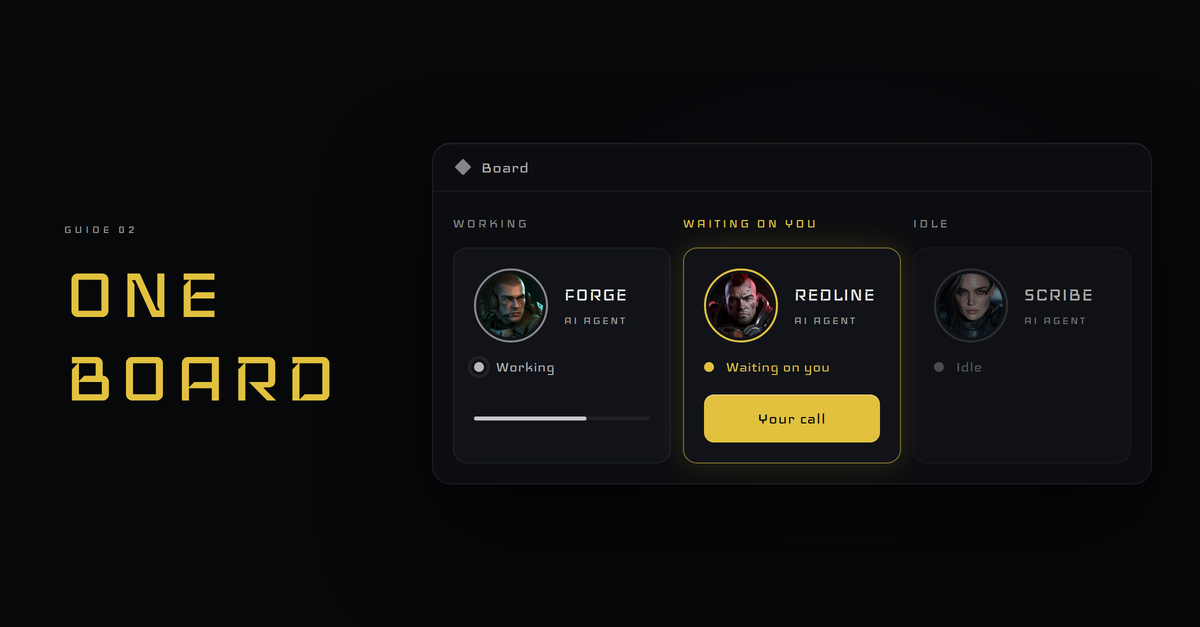
A board turns that around. Every agent shows up at once, and you read the whole crew in one look. You stop checking. You glance.
Three states are enough: working, waiting on you, idle
Every tile should answer one question first: what is this agent doing right now?
Working. It has a job and it is on it.
Waiting on you. It needs a decision, a fact or a look from you.
Idle. It has nothing open.
Give each state its own color, and make waiting on you the loudest, because that is the only one that needs you. Idle is a signal too: an idle agent should be picking up its next job.
Each agent writes its own status; the board only reads
The board does not run the agents. It reads them.
Each agent writes its own tile fields as it works: its state, its job, its open work and the time it last reported. The board reads those fields and draws the tiles. (How the agent's working note fits into the crew is in the guide to running a crew of AI agents from one screen.)
That keeps the board simple and honest. If an agent stops updating, its tile goes stale, and you see that too.
What goes on a tile, and what stays off
On the tile: the agent's name, its one line job, its state, the work it has open and when it last reported.
Off the tile: anything you would not want on a screen someone else might see. No machine names, no addresses, no keys. The board is for reading the crew, not for running the network.
Keep each tile to what you can read in a few seconds. A tile can be as plain as this:
Scout. Finds leads. Waiting on you. Open: a short list to approve. Last report: 9:40 AM.
You know who it is, what it does, that it needs you and why, all before you tap. If you need more, the full report is one tap away.
The board shows; the rail asks
The board tells you the state of the crew. It does not ask you anything.
When an agent needs a decision, it sends a card to your rail with the options and a safe default. I wrote up that side in the guide to running a crew of AI agents from one screen.
Board for looking. Rail for deciding. Keep them separate and neither one gets noisy.
Check the board on your phone, not just your desk
If the board only lives on your desk, you only know the state of the crew when you are at your desk.
Make it readable on a phone. Big tiles, plain color, one column. Then a glance in a coffee line tells you whether anything is waiting on you.
Build yours this week: one note file per agent, one page that reads them
Give each agent a short status note it updates as it works: state, job, open work, last update.
Then make one page that reads every note and shows a tile for each. Start plain. Name, state, open work. Add the rest when you find you miss it.
That is the whole board. The agents keep it true. You just look.